

How Billee Integrates with Yardi Voyager
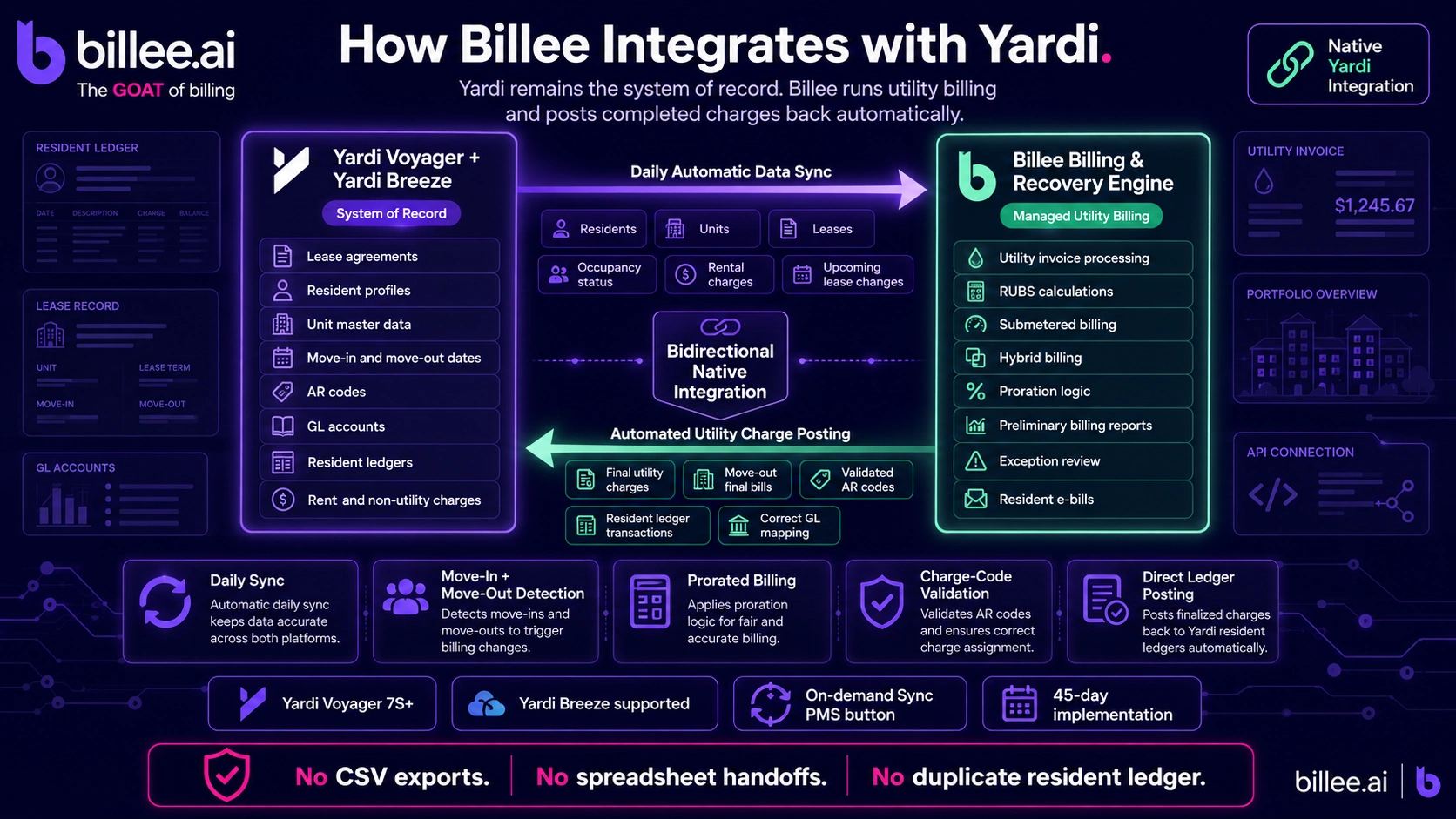
Billee integrates natively with Yardi Voyager (version 7S and higher) and Yardi Breeze via Yardi's standard web services. Operators keep Yardi as the system of record for leases, residents, units, and AR; Billee reads that data daily, runs the utility billing cycle end-to-end, and posts utility charges back to resident ledgers in Yardi automatically. No manual exports, no spreadsheet hand-offs, no duplicate data entry. The integration is bidirectional: resident and unit data flows from Yardi into Billee; utility charge transactions flow from Billee back into Yardi at billing cycle finalization.
What the integration handles end-to-end:
- Daily automatic sync of resident, unit, and lease data from Yardi to Billee
- Automated move-in and move-out detection via daily lease-status monitoring
- Utility charge posting back to Yardi resident ledgers at billing cycle finalization and at move-out final bill
- On-demand sync via the "Sync PMS" button in the Billee customer portal for between-cycle refreshes
- AR code and charge code validation against Yardi definitions before any transaction is posted
What Stays in Yardi vs. What Moves to Billee
Yardi remains the system of record for everything that is not utility billing. Billee reads Yardi data to run billing logic; it does not modify leases, resident profiles, or non-utility AR.
| In Yardi (system of record) | In Billee |
|---|---|
| Lease agreements | Read-only mirror used for billing logic |
| Resident profiles and contact information | Read-only mirror |
| Unit master data | Read-only mirror |
| AR codes and GL accounts | Read; utility charges post back here |
| Rent collection, deposits, non-utility AR | Unchanged; Billee does not touch non-utility charges |
| Resident ledgers (final source of truth for charges) | Billee posts utility charges; they live in Yardi's ledger |
This division matters for operators evaluating integration risk. Billee's integration does not require administrative access to Yardi beyond the scope of utility billing, and it does not create a separate resident ledger that needs to be reconciled with Yardi. Utility charges land directly in Yardi's ledger where the resident's entire financial record lives.
The Five Core Capabilities
Automated Resident and Lease Data Synchronization
Every day, Billee pulls current resident information, unit data, and rental charges from Yardi using the MITS-ResidentData format. The sync covers all active residents, their unit assignments, and current lease charges, with a default lookback to capture historical data and a 60-day forward window for upcoming lease changes.
When a property management company adds a newly acquired property to their Yardi instance, Billee's synchronization picks up the new property structure, imports current residents, and schedules the first billing cycle without requiring manual data entry on either side.
Move-In and Move-Out Automation
Move-ins and move-outs are the most error-prone moments in utility billing. A resident who moves in on the 14th of the month needs a prorated first bill based on the exact move-in date. A resident moving out needs a final bill that captures consumption through the move-out date and posts to their Yardi ledger before the unit is turned over.
Billee detects both events automatically through daily lease-status monitoring. When a move-in is detected, Billee creates the resident profile in the billing system and calculates the prorated first-cycle charge. When a move-out is detected, the unit moves through Billee's move-out workflow; once the final bill is reviewed and sent by the Billee team, the charges post back to the Yardi resident ledger immediately, and the unit transitions to vacant status in both systems.
Utility Charge Posting to Yardi Ledgers
At billing cycle finalization, Billee pushes utility charge transactions to Yardi via the Resident Transactions web service. Before posting, Billee retrieves available charge code definitions from Yardi to validate that the charge codes being used are configured correctly on the Yardi side. This prevents posting errors caused by mismatched AR codes and ensures every utility charge lands in the correct GL account.
Charges post to resident ledgers in Yardi at two points: the standard billing cycle finalization date (established during implementation), and immediately upon final-bill send for move-outs. Operators do not need to log into a separate billing system to trigger the posting; the Billee team handles finalization and posting as part of the standard billing cycle workflow.
Real-Time Portfolio Visibility
The Billee customer dashboard pulls property data directly from the Yardi integration, so operators see current occupancy, billing status, and recovery rate by property without leaving the Billee portal. When the Billee team identifies an exception during invoice processing, it is surfaced as a Biller Highlight in the preliminary billing report before the cycle closes, with the relevant Yardi data visible alongside the exception note.
Operators can trigger an on-demand sync at any time using the "Sync PMS" button in the Billee portal. This is useful when a preliminary billing report needs to be regenerated against Yardi data that changed after the initial pull, for example when a resident moved in between the prelim generation and the customer review.
Integration with Yardi Convergent Charge Definitions
Billee's integration supports Yardi's convergent charge structure, mapping utility billing charges to the appropriate charge definitions in Yardi's configuration. This ensures utility charges appear correctly on resident ledger statements and in Yardi's AR reporting, without requiring manual mapping after each billing cycle.
How the Monthly Billing Cycle Works with Yardi
The standard Billee billing cycle, operating on Yardi data, runs in this sequence:
- Billee pulls current resident, unit, and lease data from Yardi via the daily sync
- Billee processes utility vendor invoices and runs the allocation calculation (RUBS, submetering, or hybrid per property configuration)
- Billee generates a preliminary billing report and notifies the property management team
- The team reviews the prelim in the Billee portal, including any Biller Highlights flagged by the Billee team
- The team approves the prelim or requests a regeneration (processed within 1–2 business days)
- Once approved, Billee locks the report and posts utility charge transactions to Yardi resident ledgers
- E-bills go to all residents; billing status updates to "Billing Complete" in the Billee dashboard
The "Sync PMS" button is available at step 3 if the team needs the prelim regenerated against fresher Yardi data before approving.
What Yardi Version Is Required
Yardi Voyager version 7S or higher is required for the Billee integration. This is a hard requirement driven by the web service version compatibility check that Billee runs at the start of every sync. Yardi Breeze is also supported; operators should confirm specific Breeze version compatibility with the Billee implementation team before go-live.
Operators running Voyager versions older than 7S cannot use the native integration and would need to upgrade Voyager first.
Implementation: What the 45 Days Cover
Billee's standard implementation timeline is 45 days. For Yardi customers, the implementation covers the following Yardi-specific steps in addition to the standard billing audit and go-live preparation:
The first phase documents the property portfolio structure in Yardi, including entity IDs, property codes, and the AR code and GL account mapping that will govern where utility charges post. The second phase establishes API connectivity between Billee and the Yardi instance: credentials, endpoint configuration, and IP whitelisting if required by the operator's Yardi setup. Billing methodologies are configured per property during this phase. The third phase runs integration testing against live Yardi data before the go-live date. Billee verifies that resident data syncing correctly, that charge codes are validated, and that test transaction postings land in the correct Yardi ledger accounts. The fourth phase is production go-live, staff training on the Billee portal and billing workflow, and establishment of the support channel.
The Billee team handles the Yardi-side configuration work. Operators need to provide Yardi credentials with the appropriate API licensing and ensure AR codes for utility billing are configured in Yardi before implementation begins.
Frequently Asked Questions
Does Billee integrate with Yardi Voyager? Yes. Billee integrates natively with Yardi Voyager version 7S and higher via Yardi's standard web services. The integration syncs resident, unit, and lease data daily from Yardi to Billee, and posts utility charge transactions back to Yardi resident ledgers at billing cycle finalization. Yardi Breeze is also supported.
What Yardi version is required for the Billee integration? Yardi Voyager 7S or higher is required. The integration uses Yardi's standard web services, and Billee validates service version compatibility at connection. Operators running Voyager versions older than 7S need to upgrade before implementing the integration.
Does the integration post charges directly to Yardi resident ledgers? Yes. At billing cycle finalization, Billee pushes utility charge transactions to Yardi via the Resident Transactions web service. Charges land directly in resident ledgers in Yardi. Billee validates AR codes against Yardi's charge code definitions before posting to prevent mismatched transaction entries.
How often does Billee sync data from Yardi? The default sync cadence is daily. Resident information, unit data, and lease charges are pulled from Yardi every day. Operators can also trigger an on-demand sync at any time via the "Sync PMS" button in the Billee customer portal, which is useful when a preliminary billing report needs to be regenerated against updated Yardi data.
What happens in Yardi when a resident moves out? When Billee detects a move-out via daily lease-status monitoring, the unit enters Billee's move-out workflow. The Billee team reviews and finalizes the final bill. Once the final bill is sent, the utility charges post immediately to the resident's Yardi ledger, and the unit transitions to vacant status in both Billee and Yardi.
Does the Billee integration affect non-utility charges in Yardi? No. Billee's integration is scoped to utility billing. It reads lease and resident data from Yardi to run billing logic, and it posts utility charge transactions back to Yardi. It does not modify rent charges, deposits, or any non-utility AR in Yardi.
How long does Billee implementation take for Yardi operators? Billee's standard implementation timeline is 45 days, covering billing audit, Yardi API setup, AR code mapping, integration testing, and go-live training. Operators with complex AR code structures may run slightly longer; the Billee implementation team scopes this during the discovery phase.
Billee integrates natively with Yardi Voyager and Yardi Breeze and goes live in 45 days. See the integration in action.
Sources
- Billee Technologies, Yardi Integration Overview (internal spec, January 2026), via Billee knowledge base (verified May 2026).
- Yardi Systems, "Yardi Voyager 7S," Yardi Corporate Blog, accessed July 2026.
- Yardi Systems, "Yardi Breeze," product home page, accessed July 2026.
- National Multifamily Housing Council (NMHC), "MITS Resident Transactions 2.0 Release Summary," accessed July 2026. (Source for MITS-ResidentData XML format used in Yardi's resident data web service.)
- Yardi Systems, "Utility Billing," product page, accessed July 2026. (Source for convergent billing terminology and charge posting to resident ledgers.)
- ND Consulting, "Yardi Third-Party Integrations: The Complete Guide to Connecting Your Systems," January 2026. (Source for Yardi SIPP partner program and integration patterns for third-party utility billing systems.)
Insights and Industry Trends


Explore more insights